
TLDR; If you don’t want the story, just scroll through the titles and images.
I studied for and passed the CompTIA Network+ certification earlier this year. One of the points that many Redditors seemed to trip on, was remembering/recalling the 568A and 568B ethernet wiring termination scheme. So here’s a mnemonic of sorts that I hope will be useful. I didn’t develop the “GO” part but the rest is my own doing.
First, a reminder. You’re probably aware that the world steadily phased out half-duplex networks starting a couple of decades ago. Almost all switches and NICs today can auto-negotiate the half-duplex/full-duplex and RX/TX channels. Always, a Transmitter(TX) on one side should correspond to a Receiver(RX) on the other.
The half-duplex network required only two pairs of wiring. One pair for TX+, TX- and another pair for RX+, RX-. The full-duplex network requires four pairs of wiring. The communicating devices designate which pairs would act as TX and RX. Each pair, however, still has a positive(+) and a negative(-). Why this is so, I hope to quickly address in this post.
1 – Numbering the pins right
It’s just surprising how many people get this wrong. Part of the confusion with wrong numbering is in using just a silhouette/outline of the 8p8c(8 positions, 8 contacts) connector in diagrams. Ethernet cabling has codified the wiring schema as RJ45S. Coloquially we call it the RJ45 connector. Whatever floats the boat. I suggest visualising the 8p8c connector with the safety clip at the bottom and facing the pins. This makes it easy to remember the pin numbers ascending from left to right (same direction as we write Inglish).

2 – Wire pair colours. GO Blue.
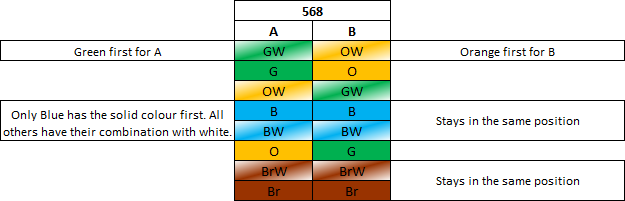
568A and then 568B use “GO Blue”. Green is the first for A. Orange is the first for B. Blue comes first and is the only colour to have solid first followed by its white combination.
3 – Name the wire pairs
The correct wire pair names have a history to them. POTS needed only one wire pair to start with and used a 6p2c connector via registered jack RJ11 for a single telephone line. When a bridged telephone line needed additional power for two lines, another pair for power was added to the existing pair; thinking of this second pair wrapping around the first pair will help you. This now became the 6p4c connector via registered jack RJ14.
When “Ethernet” was designed as a protocol and it was time to develop standardised equipment with future considerations, it would’ve sufficed to repurpose 6p4c for digital communication between two devices but WHAT IF additional power or signalling was required for each of the existing pairs in the future? Ergo 8p8c via RJ45S. 8p8c via RJ48 and RJ61 were already used for telecom networks at the time and it just made sense to use the best and highest standards of existing telecom equipment as a starting point for ethernet.
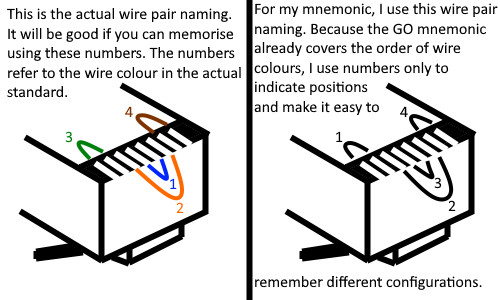
There’s a standardised wire pair naming as a result of this history. Pair 1 is the innermost, pair 2 is around pair 1. Pairs 3 and 4 are on either side of 2. Pair 3 is to the left of 2. Pair 4 is to the right of 2.
But, because we’ve got the GO Blue mnemonic already, we can disassociate the colour and pair name to use our own pair name for the convenience of learning the colours in different configurations. This is only a convenient mnemonic, not a standard.
4 – The different configurations
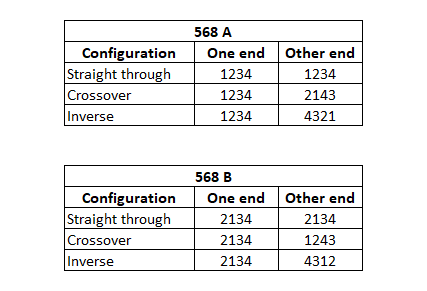
At this point, you only need to follow some simple patterns. For half-duplex networks only ST and XO pairs 1 and 2 are relevant.
Inverse/yost/rollover/console cable is used for a very specific purpose and is probably stored in a vault.
5 – TX and RX, + and –
This also has to do with the history of telephony and POTS but it’s important to note there are different pairs for half and full duplex.

1GbE NICs and above auto-negotiate(auto MDI-X) and are full-duplex by default. So even if one end is running an old 100baseTX half-duplex, having an MDI-X port at the other end won’t hurt. Knowing the wiring just makes it easy when we’re troubleshooting.

 kskspeaking