Digital security 02 of many: Symmetric-key algorithm

This series “Digital security” is from my notes prepared for certifications.

The cipher key is used to encrypt and also decrypt a message. Anyone who needs to decrypt the message, needs the key.

An algorithm is the logic/process of applying the key over plaintext to encrypt it. The cipher text can be de-ciphered/decrypted using the same algorithm and cipher-key(just called key).

When a shared key is required at both ends of a secure channel for encrypt and decrypt operations, the algorithm requiring using such shared key is a Symmetric-key algorithm. The same key is required for encrypting and decrypting.

Consider the binary XOR operation.

If A and B are two binary inputs, the XOR output is A’B + AB’.

ABA’B’A’BAB’A’B + AB’
0011000
0110101
1001011
1100000

Plaintext(Name) = 01001110  01100001  01101101  01100101

Cipher key = 0x22 = 00100010

Encrypt by performing Plaintext XOR key

Ciphertext = 01101100 01000011 01001111 01000111 = mCOG

Decrypt by performing Ciphertext XOR key

Decrypt result = 01001110 01100001 01101101 01100101 = Name

Basic XOR operation can be considered a symmetric key algorithm.

Block ciphers work on large blocks of data and generate the output at one shot.

Stream ciphers work on smaller chunks of a larger block and generate the output as the stream arrives.

Stream ciphers are useful for audio/video/conferencing which will benefit from data transfer in smaller chunks.

Stream ciphers are useful when transferring files or smaller data. With the advent of faster hard drives and faster networks, block ciphers have displaced stream ciphers in modern cryptography.

AES (Advanced Encryption Standard) is the most common block cipher. Block sizes are shown along with AES for clarity:

AES128, 192, 256, etc. Larger block sizes are more secure.

Digital security 01 of many: Cipher… Basic encryption

This series “Digital security” is from my notes prepared for certifications.

A cipher is any message that follows a pattern based on which it can be converted back to the original intelligible message.

Substitution cipher is one such algorithm of creating ciphers.

ABCDE….YZ can be substituted with letters of the same index position after circular-rotating the standard English alphabet to the left by two letters: CDEFG….AB.

Name = Pcog

and so on.

Ciphers are the earliest form of encryption.

The substitution cipher shown above, is trivial and can be easily ‘De-ciphered’ by trial and error or with a good eye for recurring patterns in language.

Any message that isn’t encrypted is called Cleartext.

Any input to encryption is called Plaintext.

Any output of encryption is called Ciphertext.

                  Cipher Key
Plaintext   ====================>  Ciphertext

Binary representation of the plaintext, allows for binary operations on which are hard even for computers to crack without knowing the cipher key.

Linux | XFS filesystem on logical partition

This post is a result of 1 day’s worth of fiddling with bash to make an xfs type filesystem on a logical partition. I’m still learning this so some concepts might not be sufficiently elaborated. Use this as a quick lookup and I encourage more reading. If you want to skip all the drama and to get to the point, jump to The Process.

I could’ve done this with much less heartache using the GUI but where’s the fun in that! Such is the masochism of a new tux convert. I was sort of a tux-agnost earlier…..

First things first. Acknowledgements are due to my friends Suhas and Balaji who introduced me to Redhat, Knoppix, Fedora, Mandrake, BSD and Ubuntu between 2001 and 2007. I wasn’t too enthusiastic about all that back then but they’re my friends and seemed upbeat about it… so whatever fanned their sail!!! What happened after 2007? I became a .NET developer. MS-DOS baby!!!!

15 years hence, I’m kind of bored and irritated by Microsoft regurgitating LAMP, Fedora, .NET Framework-Core-Standard-6(old-wHine-new-bottle hocus pocus). I quit my job and am looking to expand my software & system engineering artistic expression.

Am now a CompTIA Network+ certified engineer. And I’m happy I did it. While studying for this certification, I developed an increased respect for my Electronics and Communication Engineering course 2003-2007…. That felt good!

I was frequently reminded of those early experiences with Linux. Back then, I had two 256 MB Seagate hard drives, one LG CD-DVD drive, a 3 1/2″ floppy drive, 30-40 2HD Amkette/Sony floppies and a 128 MB Corsair SDRAM. Not to forget, all this was useless without spare IDE cables, hard-drive jumper pins, GRUB and Partition Magic 8.

In the past 15 years, I’ve definitely used and managed some “stuff” hosted on Linux, thanks to the exposure from earlier and in general, thank you stackoverflow. But I always felt that mix of fear and uncertainty during each encounter. I only knew the beast’s name and nature. Not my ability to deal with it when unleashed. Now I’m facing those fears, prodding those timid memories. It ends now! I’m studying to get certified on Linux. CompTIA Linux+ की जय!

FHS, file, directory, user, group, permissions, daemons, services, protocols, … all done. Surprisingly, not at all daunting! Then I start studying about partition tables, linked files, filesystems. How hard can it be! ext2, swap and boot were my friends right? Right? RIGHT???? And my naivety is hung out to dry.

The Process

I could’ve done this with much less heartache using the GUI but where’s the fun in that! Such is the masochism of a new convert. I was sort of a tux-agnost earlier. Deja vu! Eerily familiar feelings now. I’m working with fdisk, gdisk and parted here.

After everything was done, this is what parted -l showed. Specifically note /dev/sdb5.

[root@centosmin ~]# parted -l
Model: ATA VBOX HARDDISK (scsi)
Disk /dev/sda: 10.7GB
Sector size (logical/physical): 512B/512B
Partition Table: msdos
Disk Flags:
 
Number  Start   End     Size    Type      File system     Flags
 1      1049kB  1075MB  1074MB  primary   xfs             boot
 2      1075MB  6443MB  5369MB  primary   xfs
 3      6443MB  9663MB  3219MB  primary   ext4
 4      9663MB  10.7GB  1075MB  extended
 5      9665MB  10.7GB  1073MB  logical   linux-swap(v1)
 
Model: ATA VBOX HARDDISK (scsi)
Disk /dev/sdb: 2147MB
Sector size (logical/physical): 512B/512B
Partition Table: msdos
Disk Flags:
 
Number  Start   End     Size    Type      File system  Flags
 1      1049kB  1075MB  1074MB  primary   ext4
 2      1075MB  2147MB  1073MB  extended
 5      1076MB  2147MB  1072MB  logical   xfs
 
Model: ATA VBOX HARDDISK (scsi)
Disk /dev/sdc: 2147MB
Sector size (logical/physical): 512B/512B
Partition Table: gpt
Disk Flags:
 
Number  Start   End     Size    File system     Name              Flags
 1      1049kB  1075MB  1074MB                  Linux filesystem
 2      1075MB  2147MB  1073MB  linux-swap(v1)  Linux swap

sdb and sdc are 2GB virtual .vdi drives carved out just for this purpose.

In the standard MS-DOS Master Boot Record(for more than one reason, MS-DOS has lost its luster), we can only have a maximum of 4 partitions. So if we need to make more than 4, the standard process is to create 3 primary partitions, 1 extended partition and within that extended partition, create as many logical partitions as we need. Sounds easy.

/dev/sda was partitioned by the installer. Thankfully. I did have some recollection to keep /var, /tmp and others separate from /.

Trying out fdisk to make an MBR at /dev/sdb… I wanted to make 1 primary ext4, 1 logical xfs.

This is what I started with:

[root@centosmin ~]# fdisk /dev/sdb
Welcome to fdisk (util-linux 2.23.2).

Changes will remain in memory only, until you decide to write them.
Be careful before using the write command.


Command (m for help): m
Command action
   a   toggle a bootable flag
   b   edit bsd disklabel
   c   toggle the dos compatibility flag
   d   delete a partition
   g   create a new empty GPT partition table
   G   create an IRIX (SGI) partition table
   l   list known partition types
   m   print this menu
   n   add a new partition
   o   create a new empty DOS partition table
   p   print the partition table
   q   quit without saving changes
   s   create a new empty Sun disklabel
   t   change a partition's system id
   u   change display/entry units
   v   verify the partition table
   w   write table to disk and exit
   x   extra functionality (experts only)

Command (m for help): p

Disk /dev/sdb: 2147 MB, 2147483648 bytes, 4194304 sectors
Units = sectors of 1 * 512 = 512 bytes
Sector size (logical/physical): 512 bytes / 512 bytes
I/O size (minimum/optimal): 512 bytes / 512 bytes
Disk label type: dos
Disk identifier: 0x000d51ee

   Device Boot      Start         End      Blocks   Id  System

First, the ext4 primary partition:

Command (m for help): n
Partition type:
   p   primary (0 primary, 0 extended, 4 free)
   e   extended
Select (default p): p
Partition number (1-4, default 1): 1
First sector (2048-4194303, default 2048):↵
Using default value 2048
Last sector, +sectors or +size{K,M,G} (2048-4194303, default 4194303): +1G
Partition 1 of type Linux and of size 1 GiB is set

Command (m for help): p

Disk /dev/sdb: 2147 MB, 2147483648 bytes, 4194304 sectors
Units = sectors of 1 * 512 = 512 bytes
Sector size (logical/physical): 512 bytes / 512 bytes
I/O size (minimum/optimal): 512 bytes / 512 bytes
Disk label type: dos
Disk identifier: 0x000d51ee

   Device Boot      Start         End      Blocks   Id  System
/dev/sdb1            2048     2099199     1048576   83  Linux

Command (m for help): w
The partition table has been altered!

Calling ioctl() to re-read partition table.
Syncing disks.

Next, create the enclosing extended partition as sdb2.

Command (m for help): p

Disk /dev/sdb: 2147 MB, 2147483648 bytes, 4194304 sectors
Units = sectors of 1 * 512 = 512 bytes
Sector size (logical/physical): 512 bytes / 512 bytes
I/O size (minimum/optimal): 512 bytes / 512 bytes
Disk label type: dos
Disk identifier: 0x000d51ee

   Device Boot      Start         End      Blocks   Id  System
/dev/sdb1            2048     2099199     1048576   83  Linux

Command (m for help): n
Partition type:
   p   primary (1 primary, 0 extended, 3 free)
   e   extended
Select (default p): e
Partition number (2-4, default 2): 2
First sector (2099200-4194303, default 2099200):↵
Using default value 2099200
Last sector, +sectors or +size{K,M,G} (2099200-4194303, default 4194303):↵
Using default value 4194303
Partition 2 of type Extended and of size 1023 MiB is set

Command (m for help): w
The partition table has been altered!

Calling ioctl() to re-read partition table.
Syncing disks.
[root@centosmin ~]# fdisk /dev/sdb
Welcome to fdisk (util-linux 2.23.2).

Changes will remain in memory only, until you decide to write them.
Be careful before using the write command.


Command (m for help): p

Disk /dev/sdb: 2147 MB, 2147483648 bytes, 4194304 sectors
Units = sectors of 1 * 512 = 512 bytes
Sector size (logical/physical): 512 bytes / 512 bytes
I/O size (minimum/optimal): 512 bytes / 512 bytes
Disk label type: dos
Disk identifier: 0x000d51ee

   Device Boot      Start         End      Blocks   Id  System
/dev/sdb1            2048     2099199     1048576   83  Linux
/dev/sdb2         2099200     4194303     1047552    5  Extended

Now create the logical partition sdb5. By default, the logical partition will get created inside the sdb2 extended partition space.

Command (m for help): n
Partition type:
   p   primary (1 primary, 1 extended, 2 free)
   l   logical (numbered from 5)
Select (default p): l
Adding logical partition 5
First sector (2101248-4194303, default 2101248):↵
Using default value 2101248
Last sector, +sectors or +size{K,M,G} (2101248-4194303, default 4194303):↵
Using default value 4194303
Partition 5 of type Linux and of size 1022 MiB is set

Command (m for help): p

Disk /dev/sdb: 2147 MB, 2147483648 bytes, 4194304 sectors
Units = sectors of 1 * 512 = 512 bytes
Sector size (logical/physical): 512 bytes / 512 bytes
I/O size (minimum/optimal): 512 bytes / 512 bytes
Disk label type: dos
Disk identifier: 0x000d51ee

   Device Boot      Start         End      Blocks   Id  System
/dev/sdb1            2048     2099199     1048576   83  Linux
/dev/sdb2         2099200     4194303     1047552    5  Extended
/dev/sdb5         2101248     4194303     1046528   83  Linux

Command (m for help): w
The partition table has been altered!

Calling ioctl() to re-read partition table.
Syncing disks.

At this point, I thought I needed to change the system ID of sdb5 to something that reflected ‘XFS’. So I needed to change it to ‘5’???

Command (m for help): t
Partition number (1,2,5, default 5): 5
Hex code (type L to list all codes): L

 0  Empty           24  NEC DOS         81  Minix / old Lin bf  Solaris
 1  FAT12           27  Hidden NTFS Win 82  Linux swap / So c1  DRDOS/sec (FAT-
 2  XENIX root      39  Plan 9          83  Linux           c4  DRDOS/sec (FAT-
 3  XENIX usr       3c  PartitionMagic  84  OS/2 hidden C:  c6  DRDOS/sec (FAT-
 4  FAT16 <32M      40  Venix 80286     85  Linux extended  c7  Syrinx
 5  Extended        41  PPC PReP Boot   86  NTFS volume set da  Non-FS data
 6  FAT16           42  SFS             87  NTFS volume set db  CP/M / CTOS / .
 7  HPFS/NTFS/exFAT 4d  QNX4.x          88  Linux plaintext de  Dell Utility
 8  AIX             4e  QNX4.x 2nd part 8e  Linux LVM       df  BootIt
 9  AIX bootable    4f  QNX4.x 3rd part 93  Amoeba          e1  DOS access
 a  OS/2 Boot Manag 50  OnTrack DM      94  Amoeba BBT      e3  DOS R/O
 b  W95 FAT32       51  OnTrack DM6 Aux 9f  BSD/OS          e4  SpeedStor
 c  W95 FAT32 (LBA) 52  CP/M            a0  IBM Thinkpad hi eb  BeOS fs
 e  W95 FAT16 (LBA) 53  OnTrack DM6 Aux a5  FreeBSD         ee  GPT
 f  W95 Ext'd (LBA) 54  OnTrackDM6      a6  OpenBSD         ef  EFI (FAT-12/16/
10  OPUS            55  EZ-Drive        a7  NeXTSTEP        f0  Linux/PA-RISC b
11  Hidden FAT12    56  Golden Bow      a8  Darwin UFS      f1  SpeedStor
12  Compaq diagnost 5c  Priam Edisk     a9  NetBSD          f4  SpeedStor
14  Hidden FAT16 ❤ 61  SpeedStor       ab  Darwin boot     f2  DOS secondary
16  Hidden FAT16    63  GNU HURD or Sys af  HFS / HFS+      fb  VMware VMFS
17  Hidden HPFS/NTF 64  Novell Netware  b7  BSDI fs         fc  VMware VMKCORE
18  AST SmartSleep  65  Novell Netware  b8  BSDI swap       fd  Linux raid auto
1b  Hidden W95 FAT3 70  DiskSecure Mult bb  Boot Wizard hid fe  LANstep
1c  Hidden W95 FAT3 75  PC/IX           be  Solaris boot    ff  BBT
1e  Hidden W95 FAT1 80  Old Minix
Hex code (type L to list all codes): 5

You cannot change a partition into an extended one or vice versa.
Delete it first.

Type of partition 5 is unchanged: Linux

But what’s this? The default system ID indicates that the logical partition is of type EXT4 and I can’t change it to XFS?

I fiddled around fdisk with no luck No matter what I did, the new logical partition *Always* had system ID 83… same as sdb1. Read a few blogs but something seemed missing. They always jumped from creating the partition to calling it XFS without showing any evidence. No matter what site I followed, I got the same recommendations and the same result. Was there another config-default file which specified the default system ID for new partitions?

I switched tack and started using parted and didn’t have an issue. So how come so many people using fdisk haven’t mentioned anything about using parted as an intermediate step? Did everyone omit the same “seemingly trivial” step? I had to know! It wasn’t until I mistakenly tried fdisk to create the partition and then checkd using parted, that I saw the same output as I got with parted.

On checking this listing with parted -l, I was able to confirm, sdb5 was indeed of type XFS.

[root@centosmin ~]# parted -l
Model: ATA VBOX HARDDISK (scsi)
Disk /dev/sdb: 2147MB
Sector size (logical/physical): 512B/512B
Partition Table: msdos
Disk Flags:

Number  Start   End     Size    Type      File system  Flags
 1      1049kB  1075MB  1074MB  primary   ext4
 2      1075MB  2147MB  1073MB  extended
 5      1076MB  2147MB  1072MB  logical   xfs

To seal the deal, I used mkfs aliases to make the filesystems.

[root@centosmin ~]# ls -l /usr/sbin/mkfs*
-rwxr-xr-x. 1 root root  11520 Oct  1  2020 /usr/sbin/mkfs
-rwxr-xr-x. 1 root root 375240 Aug  7  2017 /usr/sbin/mkfs.btrfs
-rwxr-xr-x. 1 root root  37024 Oct  1  2020 /usr/sbin/mkfs.cramfs
-rwxr-xr-x. 4 root root  96336 Oct  1  2020 /usr/sbin/mkfs.ext2
-rwxr-xr-x. 4 root root  96336 Oct  1  2020 /usr/sbin/mkfs.ext3
-rwxr-xr-x. 4 root root  96336 Oct  1  2020 /usr/sbin/mkfs.ext4
-rwxr-xr-x. 1 root root  37136 Oct  1  2020 /usr/sbin/mkfs.minix
-rwxr-xr-x. 1 root root 368432 Oct  1  2020 /usr/sbin/mkfs.xfs

[root@centosmin ~]# mkfs.ext4 /dev/sdb1
mke2fs 1.42.9 (28-Dec-2013)
Filesystem label=
OS type: Linux
Block size=4096 (log=2)
Fragment size=4096 (log=2)
Stride=0 blocks, Stripe width=0 blocks
65536 inodes, 262144 blocks
13107 blocks (5.00%) reserved for the super user
First data block=0
Maximum filesystem blocks=268435456
8 block groups
32768 blocks per group, 32768 fragments per group
8192 inodes per group
Superblock backups stored on blocks:
        32768, 98304, 163840, 229376

Allocating group tables: done
Writing inode tables: done
Creating journal (8192 blocks): done
Writing superblocks and filesystem accounting information: done

[root@centosmin ~]# mkfs.xfs /dev/sdb5
mkfs.xfs: /dev/sdb5 appears to contain an existing filesystem (xfs).
mkfs.xfs: Use the -f option to force overwrite.
[root@centosmin ~]# mkfs.xfs -f /dev/sdb5
meta-data=/dev/sdb5              isize=512    agcount=4, agsize=65408 blks
         =                       sectsz=512   attr=2, projid32bit=1
         =                       crc=1        finobt=0, sparse=0
data     =                       bsize=4096   blocks=261632, imaxpct=25
         =                       sunit=0      swidth=0 blks
naming   =version 2              bsize=4096   ascii-ci=0 ftype=1
log      =internal log           bsize=4096   blocks=855, version=2
         =                       sectsz=512   sunit=0 blks, lazy-count=1
realtime =none                   extsz=4096   blocks=0, rtextents=0

Moral of the story… if you have different tools to do the same job, find out how each of them can help you get the desired outcome.

All is well that ends well. Tchuss!
Chutney podi

Ingredients:

  1. 1 cup Urad dal
  2. 2 cups Chana dal
  3. 2 cups dried coconut (Copra). Can reduce if you like hot and spicy chutney podi.
  4. 15-20 dried red chillies. Or equivalent hot chili powder.
  5. Optional for more red color: 2 Tsp Bedige/Kashmiri chilli powder.
  6. 20-30 curry leaves. Wash and pat them dry. Equivalent dried curry leaves or curry leaf power is also fine.
  7. 1/2 tsp Asefotida (hing)
  8. 1 cup Jaggery. Kids will like if added. Reduce to 1tbsp otherwise.
  9. 1 tsp coconut oil to fry chillies. Pressed oil is best. Anything else will also do.
  10. 1 golf ball size de-seeded tamarind.
  11. 2-3 cloves garlic. This is absolutely optional. I love this flavour and do it this way sometimes. You can retain the skin.
  12. 1 tbsp salt. Tata salt :).

Process:

Dry roast Chana dal on a medium flame. Do this first as the dal is bigger, more volume and takes times to cool down. The dal should turn a light tan in colour and should’ve lost all moisture by now. Spread it out on a large plate or baking tray. Newspapers will also do just fine :P.

Dry roast Urad dal on a medium flame. You can used urad with or without skin, split or whole. Just note that skin on the dal will burn if you don’t constantly attend to the roasting process. The aroma of roasted urad dal is just amazing. When done, drop the roasted urad dal on the previously spread chana dal. Air it out so all the moisture escapes.

Reduce flame to low and roast the copra till it gets oily and slightly brown. Collect this copra into a separate steel plate. This is where you’ll also collect chillies, curry leaves, hing and garlic.

Warm(just warm) 1 tsp coconut oil, reduce to a low flame. Roughly crush(not cut/paste) and drop in the garlic cloves. Keep stirring till the garlic stops sizzling. Take the garlic out and set aside. If you want to add the garlic to the powder mix, the powder should be finished within a month. I use this garlic as garnish on jeera rice or dal within 2 days.

If using fresh curry leaves, in that same garlic infused oil, drop curry leaves and continue heating on low flame. Be careful as the oil splutters on contact with leaves. Wait for the splutter to stop and take our the leaves, set them on roasted copra. Leave the oil in the pan.

If warm chillies make you sneeze or cough, rub some fresh ghee(clarified-butter)/oil on your nose and eyes. The fats help trap/dilute capsaisin build-up and preserves your chef-ly dignity. Steps in the next paragraph need to happen quickly, one ingredient over another. So keep the ingredients handy, read the next para fully and just dive into it.

In that same oil, heat the dry red chillies. Constantly stir to prevent burning or smoking. Believe it or not, you’ll actually smell an aroma from those chillies when they turn dark red. Drop in the Bedige/Kashmiri chilli powder, hing and stir for 5 seconds, all the powder should have roasted. If you’re using dry curry leaves or curry leaf power, drop that in at this stage and stir for 5 seconds.

Clear out the pan on to plate with copra. Let both sets cool to room temperature. Use this time to crush and clear the jaggery. Jaggery may have small pebbles that can be felt on fingertips. Also de-seed the tamarind and remove as much fiber as you can. Drop both of them with salt into a mixie jar. I use the small masala jar so the job is quick. If you use the bigger mixie jars, you’ll run it for longer to work all the dal but heats and cook the powder while running the mixie. Especially with the copra, there’s a tendency for the mix to form lumps. So use the small jar and quickly finish in small batches.

Drop some of the chana/urad dal on top and grind this into a coarse powder. Don’t make a fine powder. Fine powders don’t add any texture. But if you don’t like dal sticking to teeth, go ahead and make it a fine powder. Next, powder the copra and oily stuff(chillies, curry leaves, hing, chilli powder) with some chana/urad dal. Finally powder the remaining chana/urad dal. Mix all the powder as evenly as you can.

Don’t bother testing for salt…. Chutney podi isn’t about the salt. It is about the sesame/peanut oil that you’ll lace with this powder and then coat on your idlis.

Happy Chutney podi folks!

Freeplay time

Between my previous post and this one, this happened:

  • My wife and I gave birth to our second kid. Now we have a son and a daughter.
  • My son started going to school.
  • We shifted houses.
  • Govt around the world went into multiple Covid-19 lockdowns. Many vaccines and many variants of the virus.

In this context I’ve learned and grown a lot. A lot of it happening in my time alone, early mornings when I wake up hours before everyone else or while driving to/from home. Now that my son started going to school, I’m back in the cartoons-children targeted ads-finances-responsibility cycle. The last time I was in it, I was a kid myself. And I see how my parents had to navigate. A lot of conversations with my son are about how he’s having fun in school. He’s not. Not all the time. In the 6 months since he started going to school I can see changes in what he’s happy/upset about. What he can cope with and what excites him to take the lead. And every transition has happened because of rejection or acceptance by his peers. We did take him out to parks and playing with kids at their houses long before he started going to school; but he being in school with other kids and none of them having their parents aound to approve/disapprove of their actions, has really catapulted his personal growth.

This is inline with how I’ve been growing personally. Trying out stuff by myself, finding my own footing, understanding every weakness and temptation. Professionally and personally. Seeds of every change were planted during thoughts in those me-time mornings.

My daughter loves to watch her brother playing, jumping, shouting, reading, running, everything he does. I often wonder what’s going on in her head when she’s watching him. Is she going to imitate his actions or find her own self by refusing to do what she doesn’t like in all that behaviour. That’s just about the entire gist of personal change in the context of individualism. But the point isn’t about what she’s observing. It’s about what she does during all those periods of observation. She does nothing. Nothing while watching her brother, nothing while playing with us except smiling or short shrieks or trying to bite our hand/clothes. All her changes are when she’s unsupervised and left alone… in the play mat/pen when we’re going about household chores. Rolling over, push ups and side planks, trying to sit, trying to crawl.

Makes me wonder… the worth of my approval or the lack of it towards what my kids do. With my son the level of communication has really grown. He’s sitting in the child seat right behind me when he’s talking excitedly about all the stuff he did in school that day. The games they played and all the mischief with mud, sticks, toilet paper, etc, etc,… He can’t see my face while I’m driving and I can’t see him. He has understood what pauses mean I’m giving all my attention to driving or considering a response. And he knows by the length of a pause if I’m about to ask a clarification or go along with his story.

A thing is considered to be living if it can respond to stimuli. I starting to think… our ability respond, the will to do so and the nature of response are developed only when unsupervised. #ātmā, #paramātmā, #FreeWill.

There’s another point to consider. What about the role of a guru/teacher/role-model/leader in inspiring change? Don’t we all learn and emulate? Don’t we follow instructions and repeat actions based on a set process? And this is what I think… They’re all only different types of parents. They approve/disapprove. Their actions can affect our experience but what we choose to do is still our own. Our own journey to find meaning, purpose and success.

Orthodox Brahmin family hygiene related practices visited in light of COVID19

So here’s a quick list of things that are very normal for a Kannada/Tamil/Telugu Brahmin family. This might be the case for Brahmins from other regions as well but I can only speak to what I know. Many of these practices are still followed in today’s day and age in Urban and Rural India. Now these are just put here in no specific order. I could add more as I recollect or am reminded of them.

  • Leave your footwear outside. Don’t wear them inside the house.
  • Wash your face, hands and legs when you get home. Do the same when you go to other people’s homes(basically help them also stay clean).
  • Have a full bath (including hair) on: birthday, every haircut or visit to doctor/hospital, after returning from a cremation/grieving family.
  • Don’t touch anybody.
  • Don’t touch anything that’s not yours.
  • Don’t touch anything unless absolutely required.
  • When in the market, don’t touch something if you’re not sure of buying it.
  • Don’t spit in public places and open areas.
  • Don’t clean your nose in public places and open areas
  • Don’t piss standing up(for men).
  • Wash you hands and legs before and after a piss/poop
  • Greet people with a Namaskaara 🙏🏾
  • Don’t enter the kitchen if you haven’t showered.
  • Don’t touch any stored food items with damp hands or wet spoons or wet ladle.
  • Strict quarantine with separate room, utensils, mattress and clothes for sick/ill people at home.
  • Clear indication with neem leaves outside home where anyone is seriously ill or recovering.
  • Wash before prayers. Take a bath if possible.
  • Strict quarantine for women at home during their periods.
  • Don’t let anyone else come and lift newborn infant in first month. Similarly, don’t ask to hold another person’s infant in it’s first month.
  • Don’t touch a bed that you don’t sleep in. Especially, don’t get on a bed that a married couple uses (unless you are their child and you aren’t yet married).
  • Don’t wear wet or damp clothes.
  • Don’t carry wet or damp clothes while traveling.
  • Don’t use another person’s comb or towel.
  • Drink water without touching the glass… by pouring it into your mouth or trapping it with cupped hands instead of sipping at the glass/utensil.
  • Don’t share cutlery after you’ve started eating.
  • Don’t share food from your plate after you’ve started eating and similarly, don’t take it from another person’s plate after they’ve started eating. Kids whose milk teeth haven’t yet started falling off, are exempted from this rule.
  • Don’t wear unwashed clothes.
  • After touching fermented or pickled foods, wash and dry your hand before touching any other food items.
  • After touching food items with gluten(boiled rice, dal, etc), wash your hands before touching anything else.

Definitely controversial and almost dead practices:

  • If dirty people come home, restrict them to outer visiting room. Note… If you are restricted in the first visiting room by the host, it does not mean than you are seen as “dirty”.
  • Wash the floor and surfaces that visitors have touched when they came to your house. Even if they are relatives. If you have been the visitor, accept that the house will be cleaned after you leave. Don’t take it personally. It is only in rare cases like a teacher or royalty’s visit that the place they visited and items they touched/used are actually worshipped.
  • Always keep a separate set of clean washed bed upholstery for visitors to use. Host family should avoid using this same set as much as possible.
  • When traveling, carry your own bedding.

Ownership and nirvana

Today my usual 5-minute-silence-after-waking-up lasted about 20 minutes and I thought of some things for the first time in many years. Especially about ownership. Today is my friend’s birthday and I wanted to wish him but since he is in a different timezone I chose to wait until after sunrise in his timezone before giving him a call. Thinking of him and our conversations, I was recollecting a wide period from high-school to college. My dreams, ambitions, goals and choices. Needless to say, he’s a pretty close friend who has been a good sounding board and rooting to reality. Showing me a mirror or a finger, whichever was appropriate in response to my eccentric imaginary journeys. Happy birthday to you we-has-us.

Looking back, I’ve pretty much landed where I wanted to be. I wanted to be ‘dad’ by 30, it was delayed by 1 month and 7 days. I had started learning 1 foreign language other than English (on second thoughts, correct classification would just be one-more-language). I wanted to own a car and a house. The first lost steam because the second didn’t pan out as planned. I now repay a housing loan for a house that doesn’t exist and for money that was borrowed and just disappeared (basically charity to the bank). For all those that did happen, I am very thankful to my family, friends, colleagues and adversaries (feed for a later thought: declining usage of enemy, adversary and rival over the centuries).

The undercurrent of all these thoughts were I want to have/be/become/get <thing>. And that is the train of thought for this blog.

Accumulation

At the outset, have and get are clearly acts of assimilating ‘things’ from outside while be and become seem aligned to self-realization. Or is it so? Everything I’ve had, got, attained or become, was a result of selfish pursuit. With just a thin line differentiating selfishness from greed, I’ve managed to stay clear of greed. Or have I?

Many things that I once planned/hoped to own, I did own and later they also got discarded pretty unceremoniously. Heck! I don’t even remember those things to name as an example here! Some of them got unpopular (phones, laptops, hairstyles). The only evergreen avenue has been ‘travel’ which after 16 Indian states and 18 countries, still feels like just the tip of the iceberg. So yeah… Travel experiences are the only accumulation that don’t feel lost or wasted. All the rest seem ready for the garbage dump.
The clothes I wore, wear or will wear in future will all go to the garbage and this holds for all my possessions and me too.

Then what is it that I work for all my life? I sure do want a pleasant future for myself and my people but hasn’t that been the same pursuit all along? A pursuit whose means I don’t remember and whose end I don’t see? I guess nirvana is the next target. Not to be, have, own, get or become but to attain. A long journey that starts with myself and ends within myself. Everything else I own and am attached to or associated with, will only be a peripheral accessory suited for its specific purpose and duration.

Time is my currency

If you’ve watched the Andrew Niccol movie In Time and understood it, you’ll probably grasp this post more easily. Never mind if you haven’t because this isn’t related.

Until a certain time in our life, we are truly innocent of our ability to alter karma. I say ‘innocent’ and not ‘ignorant’ because many people warn us about consequence of our actions but we truly realize our ability to treat the world as an impulse response black-box only after realize that by ourselves. The difference between knowing and realizing is just that we are constantly aware of our ability to send out an impulse and see the response. I apologize for the digress but it is important for the purpose of this blog, to state this difference.

A person with a natural talent and interest in painting can almost effortlessly make a replica of the Mona Lisa in less time than a person who isn’t naturally talented but works long and hard at it. I would argue the satisfaction of the outcome is higher for the person who worked hard compared to the other who seemed gifted. With conscious effort and spending a lot of time, the person without a natural talent can eventually become comparable to the other person or even exceed them. All that comes as a consequence of this development, is a result of spending time on painting rather than on running, watching TV, movies, writing a book or developing finer skills in some other interest. The elevated skill is now distinct a karma of the time-bound choices made towards painting among other things in that person’s life.

Put simply, whatever we practice, we get better at it. Whatever it is we spend a lot of time on, we get better at it. Compassion, sarcasm, swimming, coding… whatever!

Every choice we made, is a choice that took our time away from other options. We spent our time studying/preparing for a job that we are doing right now. If we aren’t happy with what we do, we spend some time searching for something else because we don’t want to waste our time on our current job. Maybe we spend too much time commuting to-from work and we think that time can be put to better use? So we could either get a job near our house or spend some money and buy a car. Money spent on the car was earned by spending time at a job doing stuff that was useful for someone. The talent/ability to do that specific job was gained by spending time in studying/preparing for it in such a way that our abilities were judged to be better than the ability of the other people who applied for the same position.

Drilling such examples down back to the start, I’m sure there comes a point where we start second guessing ‘destiny’, ‘divine plan’ and all those heady theories. For the most part, we don’t need to care any bit for that kind of stuff.

Our life and everything we come in contact with, is a result of how we shape our time. This is a parallel thought about karma being our choice rather than karma being only consequence of our kriya. Till our innocence about karma is shed, it is impossible for us to comprehend a greater possibility in our life. But once we do, we are transacting with ourselves, and others, using only our time. For a simplistic view, let us consider that a person spends 16 hours a day awake and 8 hours asleep. How much of the 16 hours is spent in activities performed by our own volition, and the quality of time during the 8 hours of sleep, shapes our life. The worth of each minute/hour isn’t quantitative as it changes based on our interests and abilities. That gives us sufficient ground to not be judgemental about people who can’t do what we do or those who can’t think as well we do (I sound swell headed with that line).

Anyone who’s now talking about residual income compared to linear income, should also consider that awareness of possibilities/income-options is a choice in collecting information and then the willingness to act on it. That is, time spent in learning about possibilities and then the time spent in acting on it versus other possibilities.

Now all those who talk about the relevance of this post on people who are dealt a bad hand in terms of opportunities, exposure and social setting; just know that there come many situations in anyone’s life when we see the chance to become more/different than what we’ve been. How we grab that chance is purely a result of our search within, our longing to be become different, our longing to know and realize more; finally, our longing to become liberated from the life/choices we’ve had to endure till the time of such a longing.

What I do with my knowledge and strength is what defines me. One way or another, that knowledge and strength were gained in exchange for my time. I choose to spend time cleaning and tidying up because doing it helps my health and my family to do other things in their time. I choose to spend time with my family in person or over a call. I choose to spend time learning new stuff. I choose to spend time on being healthy. I choose to work on things that are useful to myself or other so that I can earn money for financial well-being. I choose to use public transport and to engage in activities that are environment friendly so that I can leave the planet as clean as possible for for my future generations. I choose to be involved in politics because the choices I make, shape the future. I choose to be a vegetarian or vegan because I don’t want any part in raising fish/poultry only to be killed to fill my stomach. I choose to spend time on dressing up and looking good. I choose to sleep and wake up at times that are conducive to pursue my all my choices. I choose to use my time to become truly liberated. I can choose only within the time that’s left for me, not after.

The ACN Opportunity

Home based online business

For a first year fee (AUD 549) and from the next year an annual fee (AUD 165), I acquire franchisee of a web based platform to match or beat rates of utilities and services used at home and by small businesses. These are:

  • Electricity (with or without solar)
  • Gas
  • Phone (fixed line)
  • Mobile (postpaid, SIM-only or new)
  • Home broadband
  • Home and business security
  • Small business payment systems (EFTPOS, online payment gateway, etc)

Highlights

  1. Sell or convert essential home/small-business utility bills to operators providing packages through ACN. Usually the discounts and offers are better than what you can get directly from the service provider.
  2. Residual income through customer acquisition.
  3. Will-able, transferable, saleable business
  4. Direct marketing and also network marketing but not a pyramid.
  5. Business can be performed in 26 countries through a web storefront which can be obtained on a franchise basis.
  6. No imposed time-based targets. You can decide the speed at which you acquire customers.
  7. Income is a percentage of personally acquired or partner acquired customer’s monthly bills. Additional customer acquisition bonuses are provided depending on number of customers acquired and the number of qualified business partners working with you.
  8. Income is good enough after 3-4 years of operating. Some of the business owners who initially started out by treating the ACN opportunity as a part time additional income stream, enjoy the freedom to quit their day job and continue on the ACN opportunity whenever they please.

Not a pyramid MLM scheme

Commissions earned depend on number of customers acquired personally and on the number of customers acquired by partners in your team. Benefits are not passed on or curtailed to upper tiers if the upper tiers haven’t acquired sufficient customers directly or in their team. There’s no income if customers are not acquired, so this is not a fraudulent system.

What you can do for me and for yourself (one or more of below)

  1. Share details of your home utilities bills or business utility bills and business EFTPOS details, all that are applicable to you. I will compare rates and let you know if I can match or better the rates of your current providers. If you are satisfied, you can become my customer.
  2. If the opportunity to earn commissions from your bills and also on bills of others is exciting, you could become my business partner(called an IBO… Independent Business Owner in the ACN universe). The ACN support system operates in 26 countries, is very active, helpful and insightful.
  3. Share this link with your friends and family. Maybe they’ll be interested in (1) or (2) above, or maybe, they will pass it on to their friends and family.

More info

All this is definitely a lot to digest on a web page and will take a lot of writing to explain all the details. If you think this is too good to be true or if you are looking for more information, feel free to write to me(leave a comment below) or call me (you probably already have my phone number if I sent this post to you).

Cheers! Have a great day.

EDIT: Few months later. IT IS A PYRAMID SCHEME

I don’t do this anymore. 8 months into it(Feb 2019) and I stopped. This definitely is a cash-grab pyramid scheme. Commissions from bill payments are very very low. Commissions from adding people under you are the biggest component of income. I have no doubt that money comes from the money those people are paying to enter this scheme. The products are not competitive enough to be retained by customers and you’ll forever keep trying to add people in your pyramid(down-lines). I’m ashamed I failed to see through this in the beginning. My failure to catch this sooner was probably because the share of income from bill commissions wasn’t made clear from the beginning. With many people continuously leaving ACN, it was always a challenge to keep up the points required to receive maximum commissions. ACN led people to prey on their friend and family networks and grab money from their hands.

Examples:

For an electricity bill of $100, I would get $8 commission only if I had 75+ points(gained by adding customers or down-lines). With fewer points, I would get only few cents. Click Enery advertised great discounts but was always dodgy. I used their plan, the same plan that I recommended to others. They didn’t read the electricity meter properly, quaterly bills meant that I had to wait 3 months for a correction and any discount would be in the form of deductions from my next bill. Oh! And the commission was on final amount, not the original usage. ACCC penalized Click Energy (https://www.accc.gov.au/media-release/click-energy-to-pay-900000-for-misleading-claims).

I actively marketed the ‘Anovia’ payment processing product for retail outlets. First things first, Anovia don’t make the equipment themselves so they don’t have control over equipment faults and feedback. The device they provide is very old and uses more paper to print a small bill. Shops don’t like changing paper rolls that often. There was also a sneaky ‘termination/cancellation’ fee of $330 at the time. So if a shop owner wanted to switch over to Square or Tyro, they’d have to first shell out $330 to Anovia. It also didn’t help that the vendor couldn’t offer good rates to close a lead. So many times I’ve had to walk out on leads because Anovia couldn’t offer better rates and wouldn’t pay out the $50 to me if they couldn’t ‘meet or beat’ an existing bill. There was always some minor clause they quoted. And there’s also the limitation on which businesses they’d provide their services to. Tobacconists, pharmacists and a couple of other businesses were totally out-of-play. Above all that, I found out the hard way, that my commission was 1% of the charges paid to Anovia. So on a $150,000 monthly sale by a shop, Anovia’s charges would be $120-$140 and I would get commission on that. Finally, for all my trouble, I got a $500 Quantas gift voucher from Anovia for generating many leads. That really was nice.

After all this, when I called it quits and asked ACN for my commissions to be paid into my bank account, I was told that the total commission amount needed to cross a certain threshold for them to process the transaction. I didn’t even bother calling them again.

One one of the ‘business meet’ events hosted in another ACN business owner’s house, the VP of marketing was talking about how ACN rescued him from financial ruin. About how he used this last $500 to invest in ACN and vowed never to force his family to “eat rice”. Woah!! He was speaking in a community of people that predominently ate rice as the staple food. After that meeting, many people quit this scam.

Learned a lot for $49 (considering I got $500 voucher from Anovia). Made some good friends too. I let it go.

Supporting links 2021:

Wiki Vandalism by Rahul Gandhi Bhakts

Timeline of events:


1…
11 June 2018, 8:45AM UTC

Rahul Gandhi saysCoca-Cola company ko shuru karne wala ek shikanji bechne wala vyakti tha…” (Coca-Cola company was started by a person who used to sell Shikanji).

Reported with video coverage.


For those of you who don’t know:

  1. Shikanji is an Indian version of lemonade. This word “Shikanji” is used in Hindi-speaking parts of India.
  2. John Pemberton was the inventor of Coca Cola.

2…
11 June 2018, 9:28AM UTC

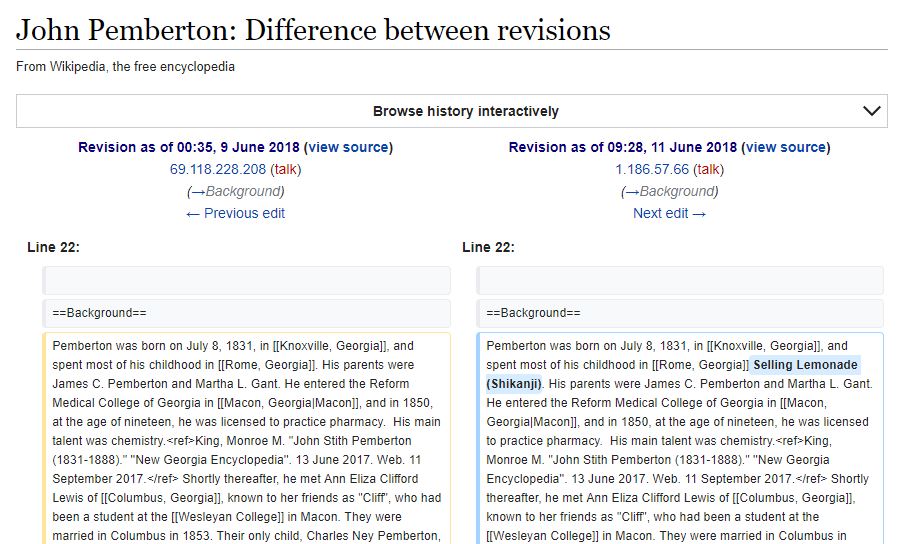
Rahul Gandhi bhakts vandalize the Wikipedia page of John Pemberton to make it seem like Rahul Gandhi’s claim was legitimate and recorded in Wikipedia.


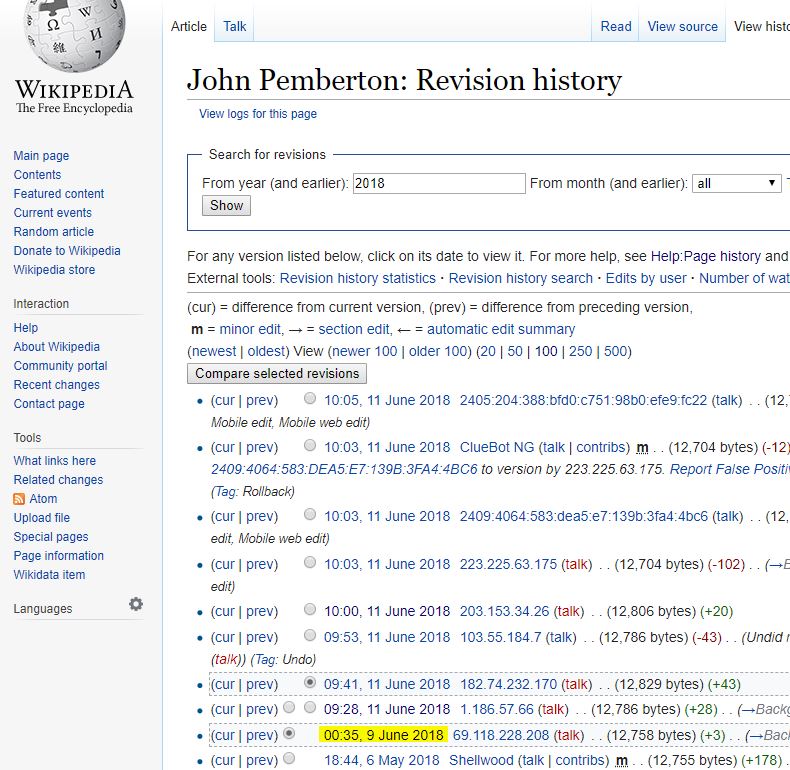
Pic01

The last valid edit on John Pemberton’s wiki seems to have happened on 9 June 2018 at 0035 UTC. After this, the next change made on 11th June 2018 at 0929 UTC is this:

Pic02

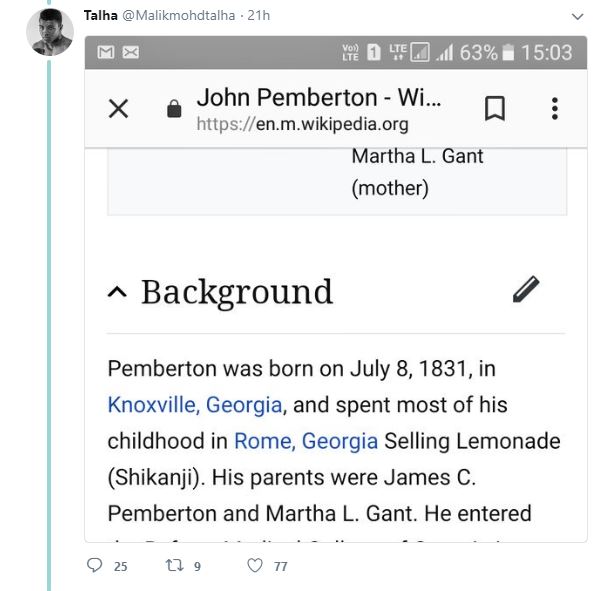
Why is this important? Well.. if someone wants to back the claims made by Rahul Gandhi, they can show Wikipedia as reference. Like @Malikmohdtalha has done below…

Pic04


Goes without saying, those who don’t know that Wikipedia pages are prone to vandalim, will believe this claim. Maybe @Malikmohdtalha was one of those victims.


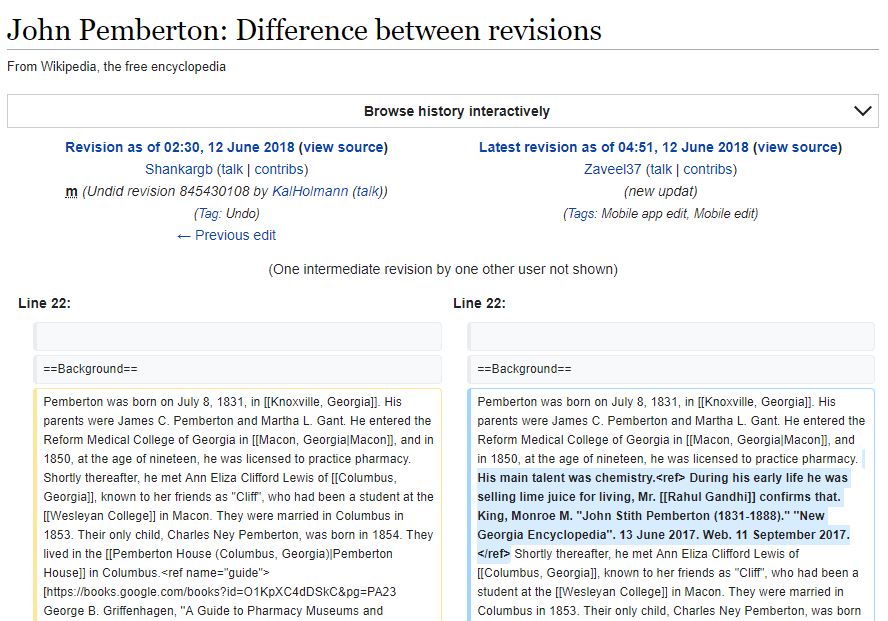
Luckily, good netizens spotted this fraud and reverted the page to its previous state, thereby reversing the vandalism.

If you thought it stopped there, you would be wrong. As of this writing, the page was vandalized several times and moderators are having a tough time keeping the wiki truthful.

Pic03


Who will bell the cat? Wikipedia is the latest fabric of truth that Rahul Gandhi bhakts want to soil, stain, contaminate and finally taint.